
New York Real Estate | 9 minute read
How to Find Foreclosed Homes Step-by-Step Using PropertyShark
By Laura Pop-Badiu | Jul 2, 2026
To help real estate professionals find foreclosed homes in a timely and efficient manner, this guide breaks down every step of the research process — from understanding foreclosure status all the way to finding contact information for owners and looking past LLCs.
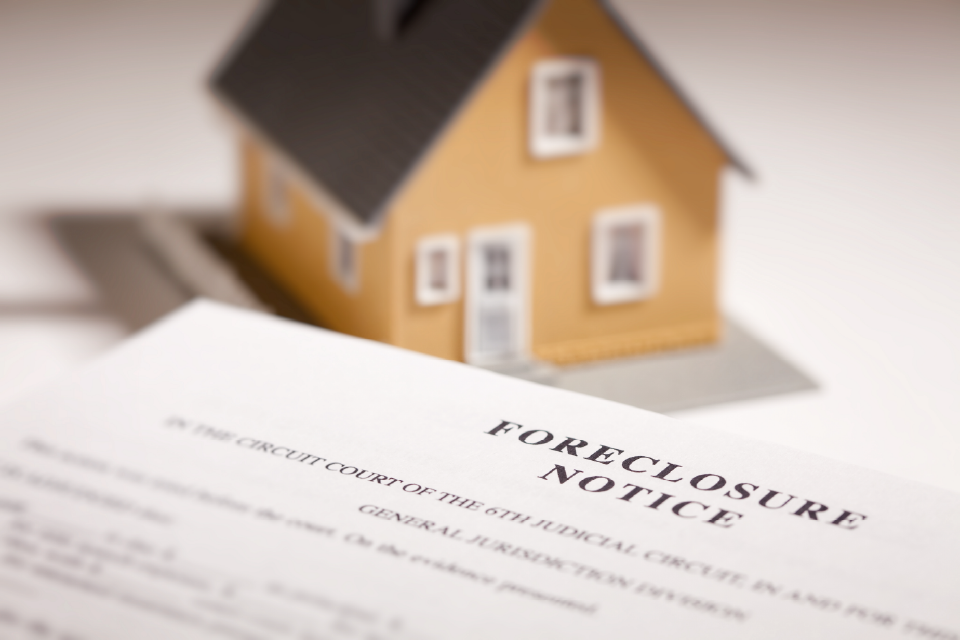
Foreclosed homes are properties repossessed by the lender after the previous owner defaulted on the mortgage. Finding them early matters because foreclosure filings often appear in public records before a property reaches auction or becomes bank-owned, which gives buyers, researchers and investors more time to evaluate the opportunity.
That is why public record access is so important when learning how to find foreclosed homes. PropertyShark streamlines that research by bringing together foreclosure filings, ownership records, mortgage and lien data, tax records and property details, all in one platform.
Understanding Foreclosure Status
If you want to learn how to find out if a house is in foreclosure, the first thing to know is that foreclosure law is highly state-specific. States generally use either a judicial foreclosure process, which goes through the courts (like New York) or a non-judicial foreclosure process, which usually does not (for instance, California). That is why the earliest warning sign is not always the same document in every market.
Pre-Foreclosure
Pre-foreclosure is the early stage, typically defined as the point when the owner is behind on payments and a notice of default (NOD) or a lis pendens has been filed. In non-judicial states, recording an NOD marks the start of the formal and public foreclosure process. In judicial states, a lis pendens or notice of pendency represents a recorded notice that there is litigation affecting title to the property. This is often the most useful stage for early research because the property has not yet reached the sale point.
Auction
If the process continues, the property may move to a public sale. This stage is defined by an upcoming auction or completed auction result, with statuses such as sold, cancelled, postponed or bank-owned. Depending on the state and process, the sale may be labeled as a trustee sale (in non-judicial states) or a sheriff sale (in judicial states). For researchers and buyers, this is the point where timing, opening bids and case details become especially important.
Bank-Owned (REO)
If the property does not sell to a third party at auction, it can revert to the lender and become real estate owned (REO). Specifically, REO properties are assets that have been foreclosed upon and are available for purchase directly from the lender, often because they did not sell at the foreclosure auction.
All three stages are covered by PropertyShark. The platform’s distressed property tools let users search pre-foreclosures for filings such as NOD and lis pendens, foreclosures for active auctions and bank-owned (REO) for lender-held inventory. After identifying the distressed properties of interest, you can export or save searches for updates. Moreover, PropertyShark’s property reports combine verified public-record data, deed filings and market insights, which is why the platform is faster to work with than piecing together manual research done through courts and the county recorder and assessor.
How to Find Foreclosed Homes Using PropertyShark
The following workflow works for PropertyShark users who are signed in with a plan that includes foreclosure access. Searches, exports, alerts and some data fields vary by market and subscription level, so it is worth checking what is available in the market you are researching before you build a larger workflow.
Step 1: Select the listing type
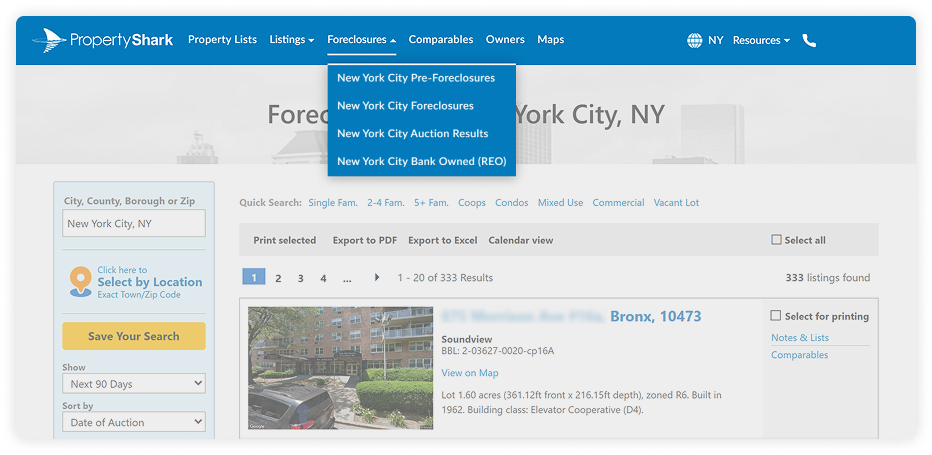
Start from the top navigation menu and choose the foreclosure stage of your interest. Use pre-foreclosures if you want early-stage filings such as NODs or lis pendens. Use foreclosures if you want active auctions or move onto auction results or bank-owned (REO) inventory to see the results of previous foreclosures (either bought at the auction or reverted to the lender).
PropertyShark separates these workflows and lets users search both pre-foreclosure filings and foreclosure auctions, for more precise results.
Step 2: Search by location
Enter a city, county, borough or ZIP code to narrow the results to your target market. Location is one of the primary search filters under both the pre-foreclosure and foreclosure workflows. This matters because foreclosure timelines and volumes can vary dramatically by county and state. Additionally, depending on the market, users can also use the location filter for auction results or REO properties.
Step 3: Apply filters
PropertyShark’s foreclosure filters ensure that users can narrow their search to look at distressed properties with specific characteristics, such as property type, square footage, unit count, building class or lot size.
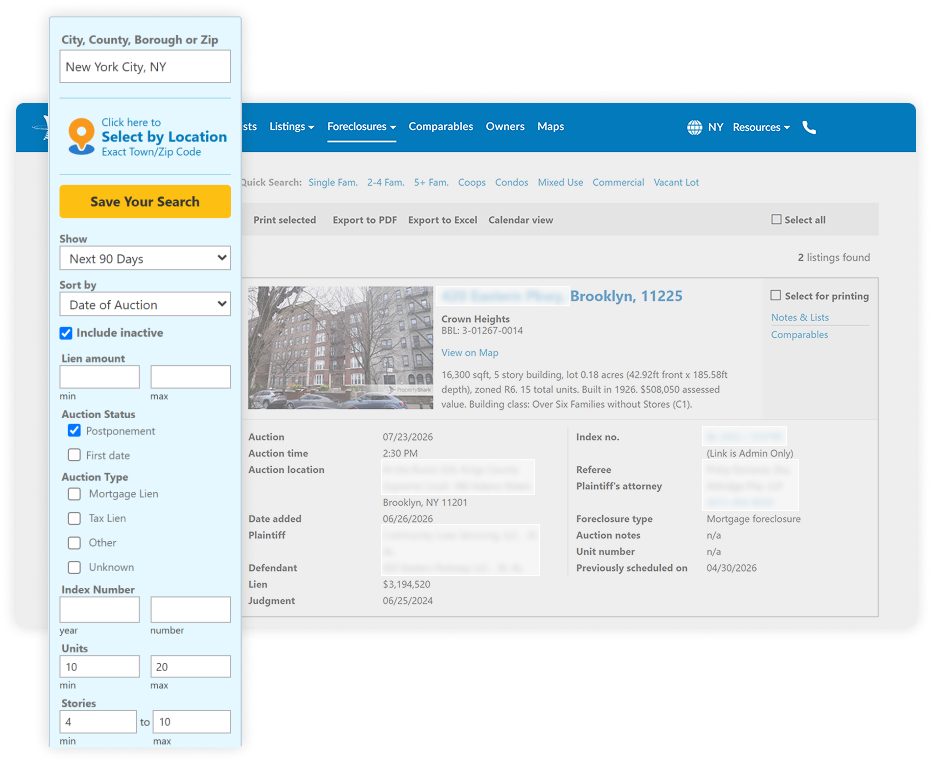
For buyers, two simple approaches usually work well. If you want recently-distressed opportunities, search pre-foreclosures and filter for desired property characteristics in your target ZIP codes. If you are focused on near-term acquisition, search foreclosures, then narrow by auction status, lien amount, property type, unit count, square feet, year build and renovated or lot size to match your buying criteria.
Step 4: Review property details
PropertyShark property reports can show current owner and mailing addresses, deed and ownership histories, ownership type, sales history, tax records, mortgage and lien data, as well as foreclosure or pre-foreclosure filings, where applicable. Users can review comparable sales and an estimated property value, which helps put the distressed status in context before deciding whether to pursue the property further.
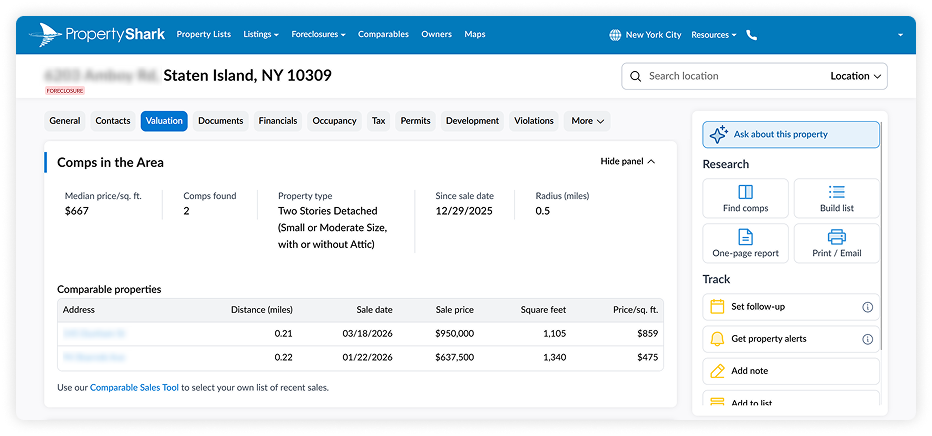
The most relevant overview comes from combining the foreclosure status with ownership history, open debt, tax burden, recent comparable sales and the estimated value range. PropertyShark’s property report functionalities are designed for the kind of in-depth due diligence that provides a comprehensive overview of a foreclosed property.
How to Find Out if a Specific House Is in Foreclosure
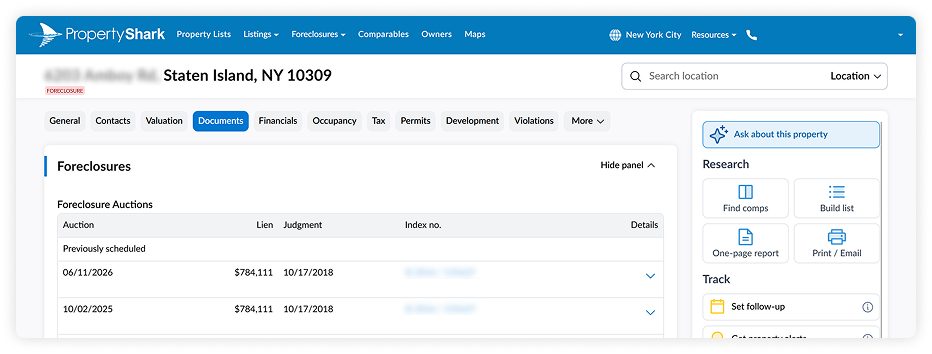
The fastest workflow when learning how to find out if a house is in foreclosure is to search the property address on PropertyShark, open the property report and look for foreclosure signals. Check whether the report shows a recorded lis pendens or NOD, review the mortgage and lien section for active debt filings and verify whether the property has moved to auction or bank-owned status.
If you are researching manually, the public record path usually leads to the county recorded plus court records, as that is where the formal notice or filing is commonly recorded.

How to Find Houses in Foreclosure Before They’re Widely Listed
If your question is how do I find foreclosed homes before everyone else, the answer is usually pre-foreclosure filings. In many markets, the first formal signal appears in public records before the property reaches auction or REO, which is why early-stage filings are so valuable. Pre-foreclosures serve as a way to identify motivated owners before the property goes to auction, which is why PropertyShark search tools aggregate filings into searchable results.
PropertyShark also supports saved searches and follow-up alerts. Users can save foreclosure and pre-foreclosure searches and receive new matching listings weekly or monthly. Additionally, individual property reports can be followed for updates such as new sales, ownership transfers and foreclosure filings. That makes it easier to monitor a target ZIP code or a small watchlist instead of re-running the same search manually every few days.
Quick Investor Workflow
An investor, for instance, can follow this quick workflow to find their next investment opportunity among distressed properties:
That process is much faster than checking county recorder or assessor data bases, court filings and comps platforms one by one.
Advanced Strategies Using PropertyShark Data
Once you have the preliminary list of distressed properties, the better opportunities usually come from combining foreclosure status with other data layers. Here are the main insights users can access when using PropertyShark:
Uncover Both Individual and LLC Owners
PropertyShark’s contacts section within property reports identifies whether the owner is an individual, trust or LLC, which helps determine who controls the asset and whether deeper ownership research is needed. The owner and portfolio search tools can then extend that research to related holdings, where available. But these are just a few methods of finding LLC owners in NYC.
Find Contact Information for Absentee Owners
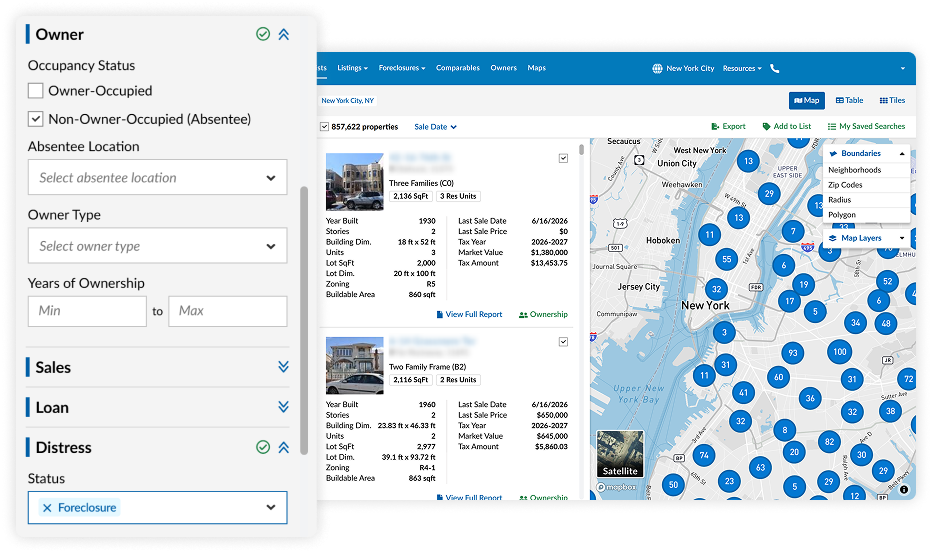
Learning how to find absentee property owners adds another actionable layer to the due diligence process. PropertyShark’s property lists tool includes filters for absentee owners and owner-occupied properties, while ownership reports include the owner’s mailing address. This can help separate owner-occupants from landlords or remote owners when prioritizing outreach or market analysis.
Determine Tax Delinquency and Debt
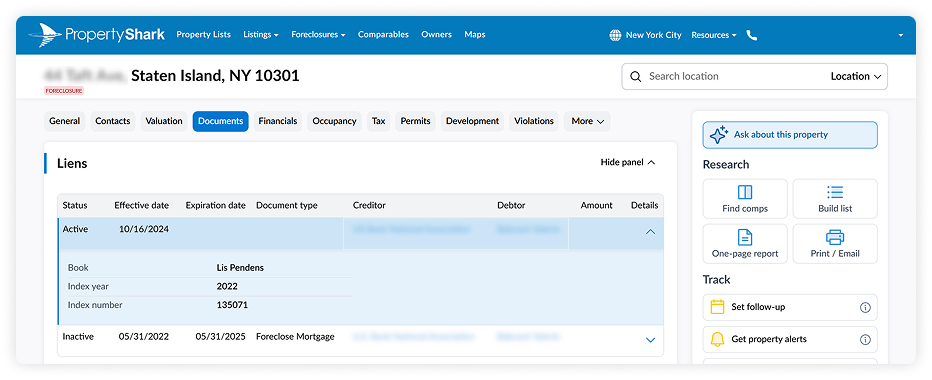
Reviewing the tax, lien and debt context is also useful when assessing foreclosed homes. PropertyShark property reports include tax and assessment data, while the title and lien information highlights access to recorded deeds, mortgages and liens. In supported markets, that allows users to combine foreclosure status with tax burden, lien load and mortgage history, instead of evaluating the foreclosure in isolation.
Review Mortgage Information
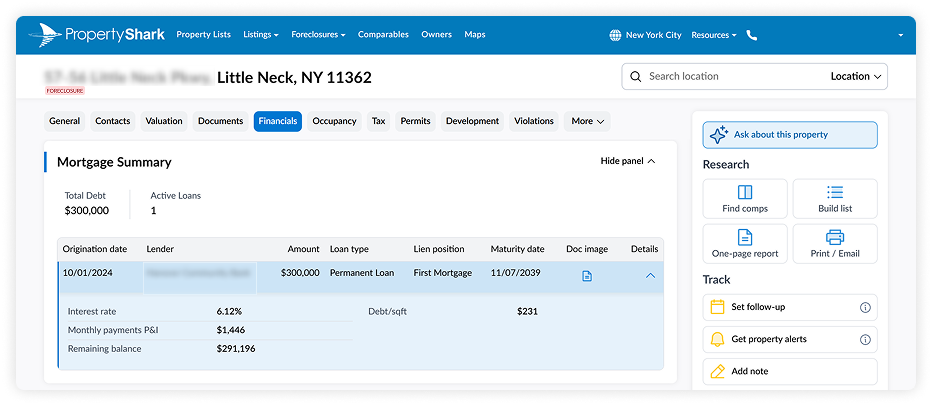
Finally, in markets where foreclosure tools support advanced debt detail, users can also review estimated mortgage maturity dates and monthly payments. For example. Such insights are particularly useful when trying to understand timing, leverage or how close a loan may be to maturity.
Step-by-Step Action Plan
- Define your target market by city, county, borough or ZIP code.
- Search PropertyShark using Pre-Foreclosures or Foreclosures, depending on the stage you want.
- Apply foreclosure filters such as lien amount, auction status and property specific characteristics, like square footage, units, stories, year build, etc.
- Open the full property report and review the public filings, ownership, tax, mortgage, lien and sales sections.
- Check out the comparable sales and estimated value in the property report to judge the deal in context.
- Save the search so you can receive new filings or auction updates and monitor auction results and REO status if the property moves further down the pipeline.
- Set up alerts for individual properties if you want to be notified of ownership transfers or foreclosure-related changes.
Conclusion
If you need to know how to find foreclosed homes, the best process is to combine public-record timing with better research tools. Foreclosure opportunities usually show up first as public filings, then move to auction and sometimes end up as bank-owned inventory. PropertyShark helps streamline that research by letting you search pre-foreclosures, auctions and REO properties by location, then layer in ownership, mortgage, lien, tax and valuation data from the property report.
For day-to-day use, that means less time jumping between recorder, clerk, court, assessor and comps tools and more time evaluating whether a lead actually fits your buying or research strategy. Keep in mind that PropertyShark is a research platform, not a substitute for legal advice, title review or market-specific due diligence before you bid or buy.

Explore the PropertyShark Foreclosures tool to find your next investment opportunity
FAQs
How can I find out if a house is in foreclosure?
Search the address in PropertyShark and look for recorded Lis Pendens or Notice of Default (NOD), then review the mortgage and lien section and check whether the property has an auction or REO status. If you are researching manually, start with the county recorder/clerk or land-records office and, in judicial states, the court file as well.
What’s the difference between pre-foreclosure and auction?
Pre-foreclosure is the earlier stage, when a default notice or lis pendens has been filed, but the property has not yet been sold. Auction is the public sale stage, when the property is offered to bidders; if no third party buys it, it may become bank-owned (REO).
Are all foreclosures publicly recorded?
The formal foreclosure process is generally public, but the exact record trail depends on state law. In non-judicial states, you may see a recorded Notice of Default, while judicial states often create a lis pendens and court case. Auction notices and outcomes may also be public. In practice, that means the public record exists, but the right place to look may be in land records, court records or both.
Can I contact owners before auction?
In many markets, yes, because pre-foreclosure filings are public and can identify the property before sale. But you should comply with state and local solicitation rules, consumer-protection rules and any laws governing foreclosure-related services or representations. CFPB and HUD both warn homeowners about foreclosure-relief scams, so outreach should be transparent and lawful.
Access comprehensive property data and ownership information with intuitive research tools.


Laura Pop-Badiu is a Senior Creative Writer at PropertyShark, with a degree in Journalism and a background in both hospitality and real estate. Laura is a certified bookworm with a genuine passion for the written word and a keen interest in the real estate market, having previously written for Yardi's RentCafe, CoworkingCafe and CoworkingMag. Her work has been featured in major publications like The New York Times, Forbes, NBC News, The Business Journals, Chicago Tribune, MSN and Yahoo! Finance, among others.
Recent Reports

NYC Homeownership by the Numbers: How Household Type, Gender & Age Shape Who Owns in Every Neighborhood
In a city where homeownership is dominated by married-couple families, Manhattan stands as the only borough led by nonfamily owners. At the same time, residents younger than 35 make up less than one tenth of the ownership pool and female-led family households outnumber male-led families across 91% of NYC neighborhoods.

Prices Rise in 32 of NYC’s Leading Neighborhoods as City and Manhattan Hit Record Highs
Q2 2026 saw NYC and Manhattan reach historic highs, with Brooklyn and Queens marking close to new records as well. Meanwhile, Hudson Yards remained at the top, Central Midtown posted its highest price ever and Carroll Gardens marked its third consecutive quarter over $2 million

2026 Q2 Foreclosure Report: Bronx Caseload Hits 7-Year High, Brooklyn & Manhattan Slow to 4-Year Low
Manhattan yet again slowed to become the city’s least active foreclosure market, Brooklyn’s caseload dropped so low it barely edged out Staten Island, while the Bronx heated up enough to surpass all boroughs except Queens.